How to Make Wayfinding Signage More User-Friendly
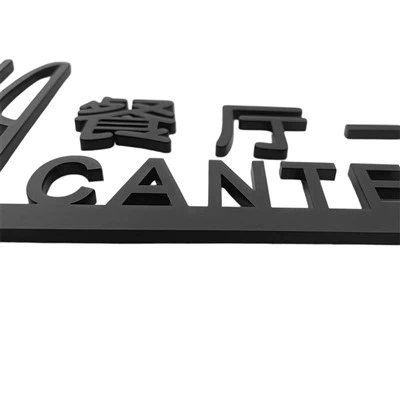
As a seasoned provider of wayfinding signage solutions, I’ve spent years observing how crucial it is for these signs to be user-friendly. Wayfinding signage is not just about putting up boards with directions; it’s a science and an art that, when done right, can significantly enhance the user experience. Wayfinding Signage
Understanding the User
The first step in creating user-friendly wayfinding signage is to understand the people who will be using it. Different environments attract different types of users, each with their own needs and expectations. For instance, in a hospital, the signage needs to be easily understood by a diverse group of people, including patients who may be in pain or under stress, as well as their families and visitors who are likely unfamiliar with the building layout.
Conducting user research is essential. This can involve surveys, interviews, and observations in the target environment. By talking directly to potential users, we can gather insights into their navigational challenges. We might discover that elderly patients in a hospital struggle to read small fonts, or that visitors to a large shopping mall are more likely to follow visual cues than text-heavy signs.
Design Considerations
Visibility
Visibility is paramount. A wayfinding sign that can’t be seen is useless. The choice of colors plays a significant role here. High-contrast color combinations, such as black and white or yellow and black, are the most legible. These combinations ensure that the signs stand out against the background, whether it’s a busy city street or a cluttered indoor corridor.
We also need to consider the lighting conditions of the area where the signage will be installed. In areas with low light, reflective materials or backlit signs can be used to improve visibility. For outdoor signage, UV-resistant materials are necessary to prevent the colors from fading over time.
Simplicity
Simplicity is key when it comes to wayfinding signage. Users should be able to understand the information at a glance. Avoid using complex language or unnecessary details. For example, instead of saying "Proceed through the double doors, turn left at the end of the corridor, then take the second right after the water fountain," a simple arrow with the destination name would be more effective.
The layout of the sign should also be intuitive. Group related information together and use clear hierarchy. Use larger fonts for the most important information, such as the destination name, and smaller fonts for additional details like room numbers or distances.
Consistency
Consistency across all signage in an area is crucial for a seamless wayfinding experience. This includes using the same color scheme, font style, and graphic elements throughout the space. When users encounter consistent signage, they can quickly learn the visual language and use it to navigate more efficiently.
For example, if all directional signs in a university campus use a specific icon to represent lecture halls, users will quickly associate that icon with their destination and be able to follow the signs more easily.
Technology Integration
Digital Signage
In today’s digital age, integrating technology into wayfinding signage can greatly enhance the user experience. Digital signage allows for real-time updates, such as displaying traffic conditions in a parking garage or updating the status of a room in a conference center.
Interactive digital signs can also provide users with personalized directions based on their current location. For example, a visitor to a museum can use a touchscreen kiosk to select the exhibits they want to see, and the kiosk can then generate a customized route.
Mobile Integration
Another way to make wayfinding signage more user-friendly is to integrate it with mobile devices. This can be done through dedicated mobile apps or by using QR codes on physical signs. Users can scan a QR code to access more detailed information about a location, such as opening hours, photos, or reviews.
Mobile apps can also provide turn-by-turn directions, similar to GPS navigation systems. This is particularly useful in large and complex environments, such as airports or convention centers.
Testing and Iteration
Once the signage is designed and installed, the work doesn’t stop there. Continuous testing and iteration are necessary to ensure that the signage remains user-friendly. Collect feedback from users regularly and analyze data on how the signs are being used.
For example, if a particular sign is consistently being overlooked by users, it may need to be repositioned or its design may need to be modified. By constantly monitoring and improving the signage, we can ensure that it continues to meet the needs of the users.
Conclusion
Making wayfinding signage more user-friendly is a multi-faceted process that requires a deep understanding of the users, careful design considerations, technology integration, and continuous improvement. As a wayfinding signage provider, I’m committed to creating solutions that not only meet but exceed the expectations of our customers.
Wayfinding Signage If you’re in need of high-quality, user-friendly wayfinding signage for your project, I invite you to contact us for a discussion. We have the expertise and experience to design and implement the perfect signage solution for your specific needs.
References
- Lidwell, W., Holden, K., & Butler, J. (2010). Universal Principles of Design. Rockport Publishers.
- Rosenfeld, L., Morville, P., & Arango, J. (2015). Information Architecture for the World Wide Web: Designing Large-Scale Web Sites. O’Reilly Media.
- Van der Voort, R., & Van der Voort, M. (2012). Wayfinding: Designing and Implementing Signage Systems. Rockport Publishers.
Hangzhou Ouyue Identification Engineering Co., Ltd.
As one of the most professional wayfinding signage manufacturers and suppliers in China, we offer a wide range of products with superior quality. Please rest assured to wholesale customized wayfinding signage at competitive price from our factory. Contact us for quotation.
Address: Fengdu Industrial Park, Pingyao Town, Yuhang District, Hangzhou City, Zhejiang Province
E-mail: 18668005627@163.com
WebSite: https://www.ouyuelogo.com/
